docx4j

docx4j from GitHub in Eclipse

May 18th, 2012 by Jason

This post is old.  Please see instead 2015/06/docx4j-from-github-in-eclipse-5-years-on/

docx4j is now on GitHub!  https://github.com/plutext/docx4j

This should make it easier for users to maintain their own branches (public or private), and contribute improvements back.

As of now, GitHub is the project’s authoritative version control.  We’re no longer updating the existing svn repository.

Its pretty easy to work with docx4j sources in Eclipse. This post shows you how.

First, make sure you have eGit installed in Eclipse.  Install it from here.  On Windows, it is also useful to have msysgit.  Refer elsewhere for how to set these up. Update: there is a GitHub Windows client now (I haven’t tried it) which apparently includes msysgit.

You also need m2eclipse

Assuming you’ve done all that, setting up the docx4j source code is just a few steps.

But first, be aware there is a difference between cloning and forking.  Cloning gives you a copy of the source code you can work on, but without more, no easy way to contribute changes back.  Forking sets you up with the source code, and makes it easy to contribute changes back.

If you think you might be making changes to the docx4j source code, you’re probably best to create a fork on GitHub right from the start.

Step 1 (optional, but recommended): To create a fork, log in to GitHub, visit https://github.com/plutext/docx4j then press the “Fork” button.

Step 2: Create your local repository (git clone)

This can be done from within Eclipse, or using Git Gui (easiest), or Git Bash Shell.

To do it from within Eclipse, File > Import .. > Repositories from GitHub:
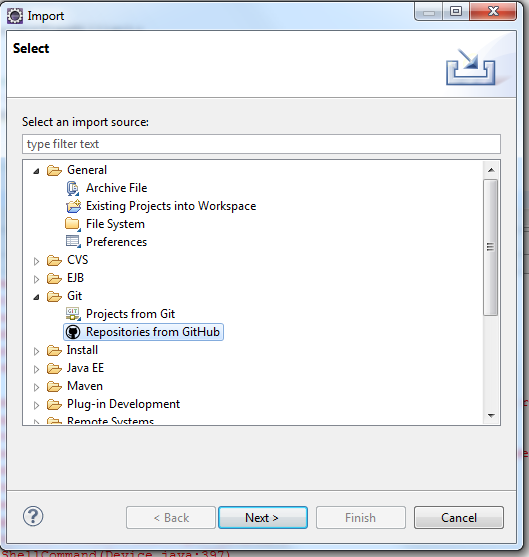
If you forked docx4j, find your fork (it might not appear immediately, which is why Git Gui or Git Bash Shell are better for this step), select it, and click next.

If you didn’t fork docx4j, type ‘docx4j’ then press ‘search’, the plutext/docxj repository should come up:
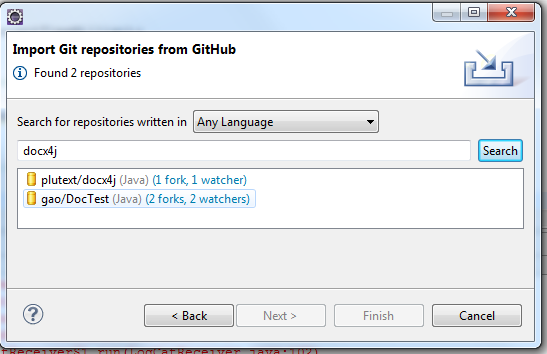
Select plutext/docx4j, then click next.

This creates a local git repository on your computer.

Step 3: Now you need to import that repository into Eclipse as a project:

File > Import .. > Projects from Git
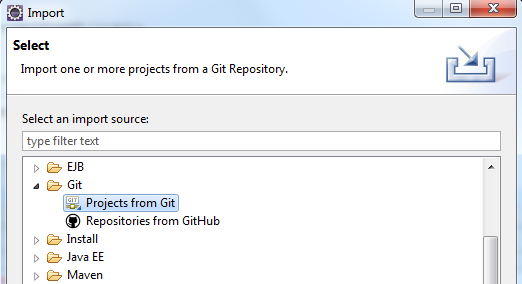
Eclipse should find the existing project settings:
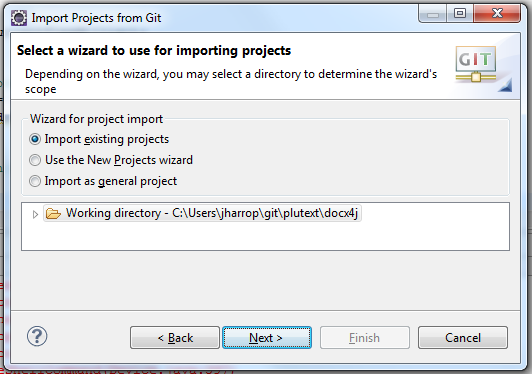
(If it didn’t and you had to use the new projects wizard; be sure to set the file location to wherever your git repository is, rather than letting Eclipse create a new empty project in the workspace)

Now you should have a docx4j project in Eclipse, and it should be properly configured (since the project settings come with the project).

You should be done. But if something isn’t right, you can configure it manually (see further below).

Next steps?  Improve the docx4j source code in Eclipse :-), then Team > Commit, to commit those changes to your local repository.

Made a change which would be useful to others?  If you forked docx4j as per step 1 above, you can push your changes to your repository on GitHub, then send a pull request.

If you didn’t fork docx4j, do that now on GitHub, then configure things locally to push your changes to your repository on GitHub, then you’ll be right to push your changes to your repository on GitHub, then send a pull request.  Other docx4j users will thank you for this 🙂

Manual configuration:

Configure > Convert to Maven Project

Properties > Java Compiler > Compiler compliance level: change to 1.6

Java Build Path > Libraries: remove 1.5 system library; Add Library … JRE System Library .. 1.6

Java Build Path > Source: check none of the entries say “Excluded: **” (remove the exclusion)

docx4j 2.7.0 released

July 8th, 2011 by Jason

I’m pleased to announce the release today of docx4j 2.7.0.

What is docx4j?

docx4j is an open source (Apache v2) library for creating, editing, and saving OpenXML “packages”, including docx, pptx, and xslx.  it is similar to Microsoft’s OpenXML SDK, but for Java rather than .NET.   It uses JAXB to create the Java objects out of the OpenXML parts.

Notable features for docx include export as HTML or PDF, and CustomXML databinding for document generation (including our OpenDoPE convention support for processing repeats and conditions).

The docx4j project started in October 2007.

What’s new?

This is mainly a maintenance release; things of note include:

  • Improvements to Maven build
  • ContentAccessor interface
  • AlteredParts: identify parts in this pkg which are new or altered; Patcher
    which adds new or altered parts.
  • Support for .glox SmartArt package (/src/glox/)
  • JAXB RI 2.2.3 compatibilty
  • OpenDoPE support improvements

Where do you get it?

Binaries: You can download a jar alone or a tar.gz with all deps or pick and choose.

Source: Checkout the source from SVN (use the pom.xml file to satisfy the dependencies eg with m2eclipse, or download them from one of the links above)

Maven: Please see forum for details (since XML doesn’t paste nicely here right now).

Dependency changes

Antlr is now required for OpenDoPE processing; this gives us better XPath processing.  The required jars are:

Getting Started

See the “Getting Started” guide.

Thanks to our contributors

A number of contributions have made this release what it is; thanks very much to those who contributed.

Contributors to this release and a more complete list of changes may be found in README.txt

A request to docx4j users

If you are happily using docx4j, it would be great if you could reply to this post with some words of recommendation for others who might be wondering whether docx4j is a good choice. I know there are thousands of you out there 🙂

Some users have been kind enough to make such statements already; these may be found on the trac homepage.

Of course, there are a number of other ways you can contribute back.  Please consider doing so, especially if you think you might find yourself looking for support from volunteers in the docx4j forums.

docx4j v2.1.0 released

November 11th, 2008 by Jason

We’re pleased to announce that we’ve released v2.1.0 of docx4j.  Get it from our downloads page.

docx4j is an open source Java library for manipulating OpenXML WordprocessingML documents, released under the Apache software licence. docx is the default file format in Word 2007 in Microsoft Office 2007, and part of an ISO standard (more or less unchanged).

v2.1.0 is mainly a maintenance release.

Attention has been paid to ease of use of hyperlinks, images, and headers/footers.

The HTML output has been redone to use the XSLT from the OpenXMLViewer project; it can be configured to save images as files, and automatic list numbers are handled.

This release should also work under Java 1.5, now that I have re-built fop-fonts.  I had contributed TTC (true type collection) handling code to FOP, and it was accepted, so fop-fonts now uses that (ie the patch which makes fop-fonts is that much smaller).

docx4j now released under Apache License

April 10th, 2008 by Jason

We’re pleased to announce that docx4j is now available under the Apache License (v2).

This is a response to feedback on an earlier post.  This is also the last license change we’ll be making to docx4j. Word documents are mostly manipulated in corporate environments.  This change removes barriers to adoption of docx4j by business and institutions.

docx4j uses org.merlin.io to efficiently turn streams inside out. That package had been available under the GPL.  Its author, Merlin Hughes, today kindly released it under v2 of the Apache License, so we now use it under that license.

There’s a new nightly build of docx4j available from the downloads page if you want to grab it.  This build can load/save to/from a WebDAV server – more on that in another post.

Click to try docx4all

February 21st, 2008 by Jason

We’ve now got a proof of concept of docx4all, our cross-platform WYSIWYG docx editor, ready for you to try. Here is the launch page to run it from your browser.  Give it a try in Linux, XP, Vista, or (if you are game) OSX.

This proof of concept includes:

  • file: new | open | save
  • text formatting (font, size, bold, italics, underline)
  • paragraph formatting (alignment)
  • cut/copy/paste
  • styles
  • printing

There is still a lot to do, but with the introduction this week of support for styles, we’ve got a basic feature set which you can use to do actual work (not that we’d recommend that just yet) – assuming you can live without tables (for the moment at least).

It is set up to run offline – it should offer to create a shortcut or a menu item so you can run it again later.

Let us know what you think of it, here or in the forums. Cheers.

.docx to HTML or PDF using Java

January 13th, 2008 by Jason

Doug Mahugh recently mentioned someone using the DocX2Html.xsl that ships with SharePoint to preview DOCX files in HTML.

As it happens, we’ve just implemented HTML and PDF output in docx4j using a similar approach. We’re using the earlier WordML2HTML XSLT stylesheet available from Oleg Tkachenko. (It would be great if Microsoft also made the presumably newer DocX2Html.xsl that ships with SharePoint freely available).

To create the HTML, we use Sun’s xhtmlrenderer (thanks Sun!). See the obligatory tutorial.

To create the PDF, we take the HTML, and run it through Sun’s pdf-renderer (thanks again, Sun). And again, the tutorial.

The icing on the cake is the PDF Viewer which comes with pdf-renderer. That will give us print preview and printing in docx4all.

Finally, thanks Lars for bringing pdf-renderer to my attention.

Howto: create a new document with docx4j

January 11th, 2008 by Jason

I’ve added a page to the wiki, showing how easy it is to programmatically create a new document from scratch.

Tutorial: opening an existing document with docx4j

January 11th, 2008 by Jason

I’ve added a page to the wiki, showing how easy it is to programmatically open and edit an existing document.

dev.plutext.org is live!

November 15th, 2007 by Jason

Today our server went live!

Its our own server, co-located, since co-location still seems to provide much better bang for buck than renting space on someone else’s box.

The wiki contains some basic content, and docx4j has been loaded into subversion.

We’ve also posted a job on elance to have the font and colour schemes made consistent across the WordPress, trac and phpBB components. So the site should look more like a coherent whole in a week or two. The next job will be the logo…

Now is a good time to thank the people at Edgewall and Thoughtworks (for Buildix), WordPress, and phpBB for writing the software which makes this site possible – not to mention the rest of the stack: Apache, Linux etc etc.

Cheers!